

Getting into your Amazon Vine dashboard can feel confusing, especially when you are not sure which account to use or whether you still have access. This guide walks you through the Amazon Vine login process, explains how invited reviewers can reach their dashboard, and shares simple fixes when the page does not load.
What Amazon Vine Login Actually Means
If you are searching for amazon vine login, you probably want to reach your reviewer dashboard, check pending reviews, or confirm whether an invitation still works. The key point is simple: Amazon Vine is not open to everyone. Amazon describes Vine as an invitation-only program that selects insightful Amazon reviewers to become Vine Voices.
That means an amazon vine sign in only works if your Amazon account has already been invited and accepted. There is no separate Vine username, public application form, or paid upgrade. In the USA, reviewers usually sign in with the same Amazon account they use for shopping.
How to Access the Amazon Vine Reviewer Dashboard
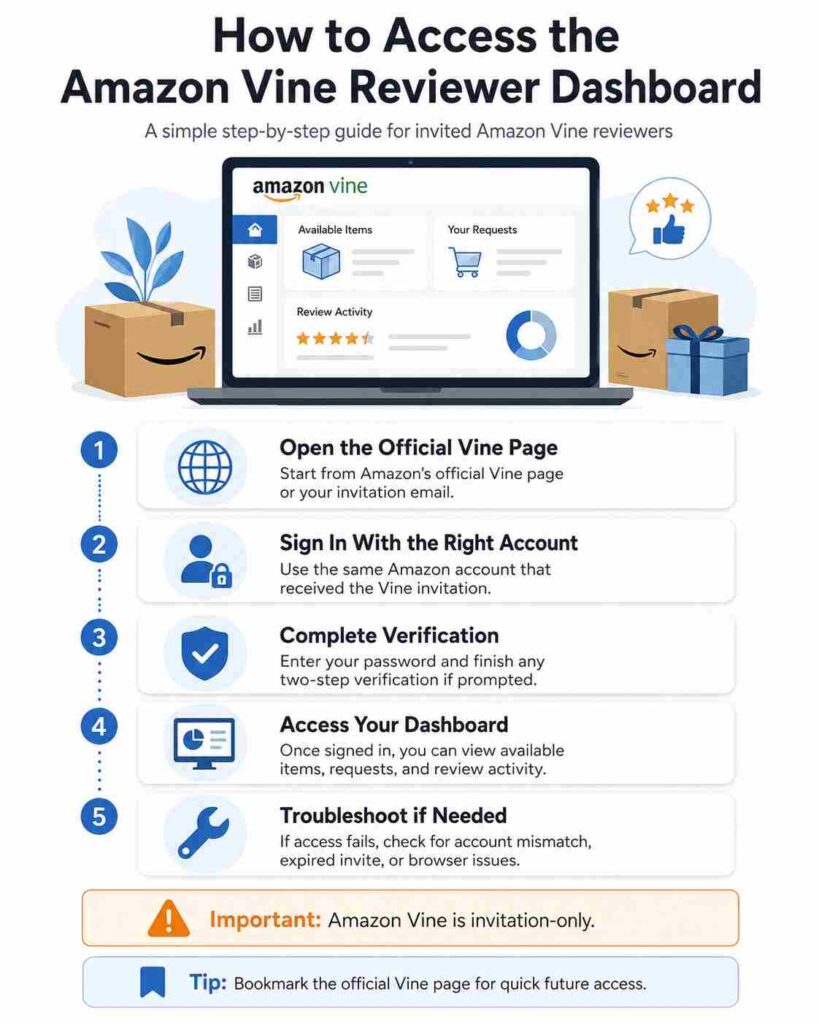
The safest way to complete your amazon vine login is to start from Amazon’s official Vine page or your original invitation email. Ensure you are signed in with the same email address that was sent the official invitation.
The process is straightforward: open the Vine page, choose sign in if prompted, enter the invited Amazon account details, complete two-step verification if it appears, and wait for the reviewer dashboard to load.
Many people search phrases like vine amazon login, amazon vine log in, or amazon.vine login because they cannot remember the page. Be careful with results that are not Amazon. A real Vine login should not ask for a new password, payment, “activation fee,” or third-party registration.
Why Amazon Vine Sign In May Not Work
A failed amazon vine sign in does not always mean your Amazon account is broken. Most problems come from the wrong account, missing eligibility, or a browser issue.
Common reasons include using a different Amazon account, signing in from the wrong regional marketplace, opening an old invitation link, blocking cookies with browser extensions, using a VPN, or trying to access Vine without an active invitation.
First, sign out of all Amazon accounts. Clear your browser cache, reopen the official Vine page, and sign in again with the email that received the invitation. If normal Amazon shopping works but the dashboard does not appear, your account may not currently have Vine access.
What You Can Do Inside the Dashboard
Once your amazon vine login works, the dashboard becomes your review management area. You may see available items, requested products, review status, account messages, and activity details.
Use it carefully. If you request a product, test it in a normal setting and write the review while the experience is fresh. Amazon says Vine is designed to collect unbiased reviews from trusted customers. A strong review explains what worked, what did not, who the item suits, and whether the product description matched real use.
Reviewer Login vs Seller Login
The phrase amazon vine log in can mean two different things. Reviewers access the Vine Voice dashboard. Sellers and brand owners use Seller Central to enroll eligible products in Vine.
Amazon’s seller guidance shows that Vine enrollment is tied to seller requirements, including professional selling and brand-related permissions. In plain terms, customers should not use Seller Central for reviewer access, and sellers should not expect the customer dashboard to manage product enrollment.
Also Read: How to Freeze Location on Find My iPhone: Safe Privacy Fix
Safe Login Tips for Vine Amazon Login Searches
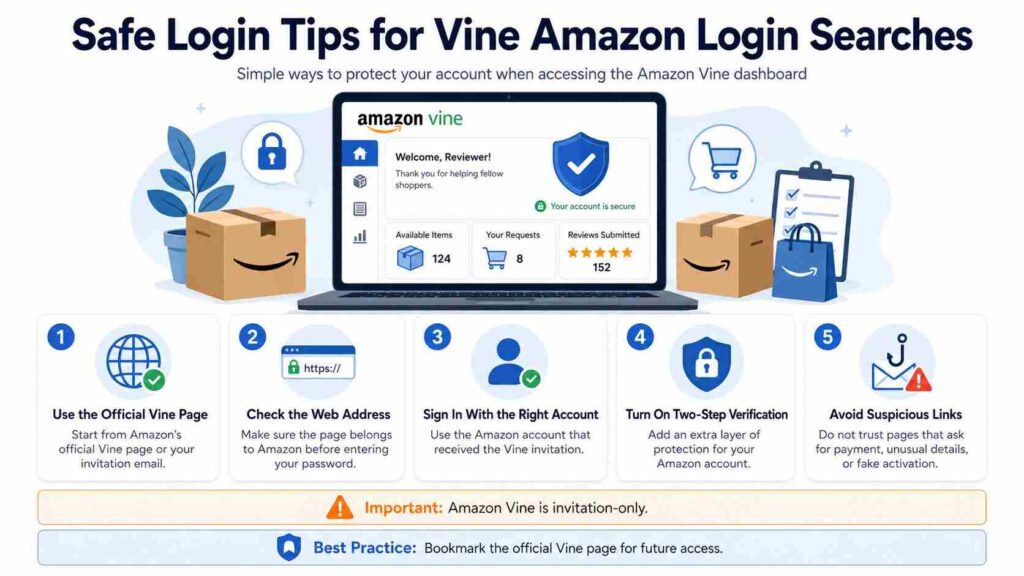
Because users often type vine amazon login or amazon.vine login into search engines, fake or low-quality pages may appear. Stay cautious. Amazon will not ask you to buy a Vine invitation, pay to unlock the dashboard, or verify your account through an unrelated website.
Use two-step verification, avoid signing in on public Wi-Fi, and bookmark the official Vine page after successful access. If a page asks for unusual personal details, close it and start again from Amazon.
Conclusion
Amazon Vine login is simple when you use the right account and official access path. If the dashboard does not load, check for account mismatch, browser issues, regional marketplace problems, or missing eligibility. Your next step is to read a full Amazon Vine guide so you understand reviewer expectations before requesting products.
FAQs About Amazon Vine Login
Is there a separate Amazon Vine login?
No. Amazon Vine uses your regular Amazon account. The dashboard only appears when that account has active Vine access.
Can anyone join Amazon Vine in the USA?
No. Amazon Vine is invitation-only. Helpful, detailed reviews may improve your reviewer reputation, but they do not guarantee an invitation.
Why does the Vine page say invitation only?
It usually means the account you are using does not have Vine access. Try the account that received the invitation.
Is amazon.vine login the official page?
No. “amazon.vine login” is usually just a search phrase. Use Amazon’s official Vine page or your invitation email.
